
An app for Mac
Beautiful App Store screenshots, at the right size, in minutes.
AppShot puts your screenshots in device frames, adds a background and a title, and exports pixel-exact PNGs for iPhone, iPad, Mac, Apple Watch and Apple TV.
iPhone Duo frames are here
Frames for both the outer and the inner display, portrait and landscape, plus an open pose that shows the outer display and the back. Export all four App Store sizes for iPhone Duo, in any frame colour.
Three steps from raw screenshot to store-ready image
No Figma, no templates. It all happens in one window.
Drop your screenshots in
Drag images from Finder into the list. AppShot picks the device size for each one.
Pick a frame, background and title
Drag things right on the canvas. Copy one image’s style and paste it onto the whole set.
Export PNGs
Pixel-exact for App Store Connect. What you see is what gets exported.
Features
Device frames
iPhone (including the new iPhone Duo), iPad, Mac, Apple Watch and Apple TV. Rotate and scale freely.
Backgrounds and type
Solid colours, gradients or images. Titles and subtitles in any font on your Mac.
Panorama backgroundsPRO
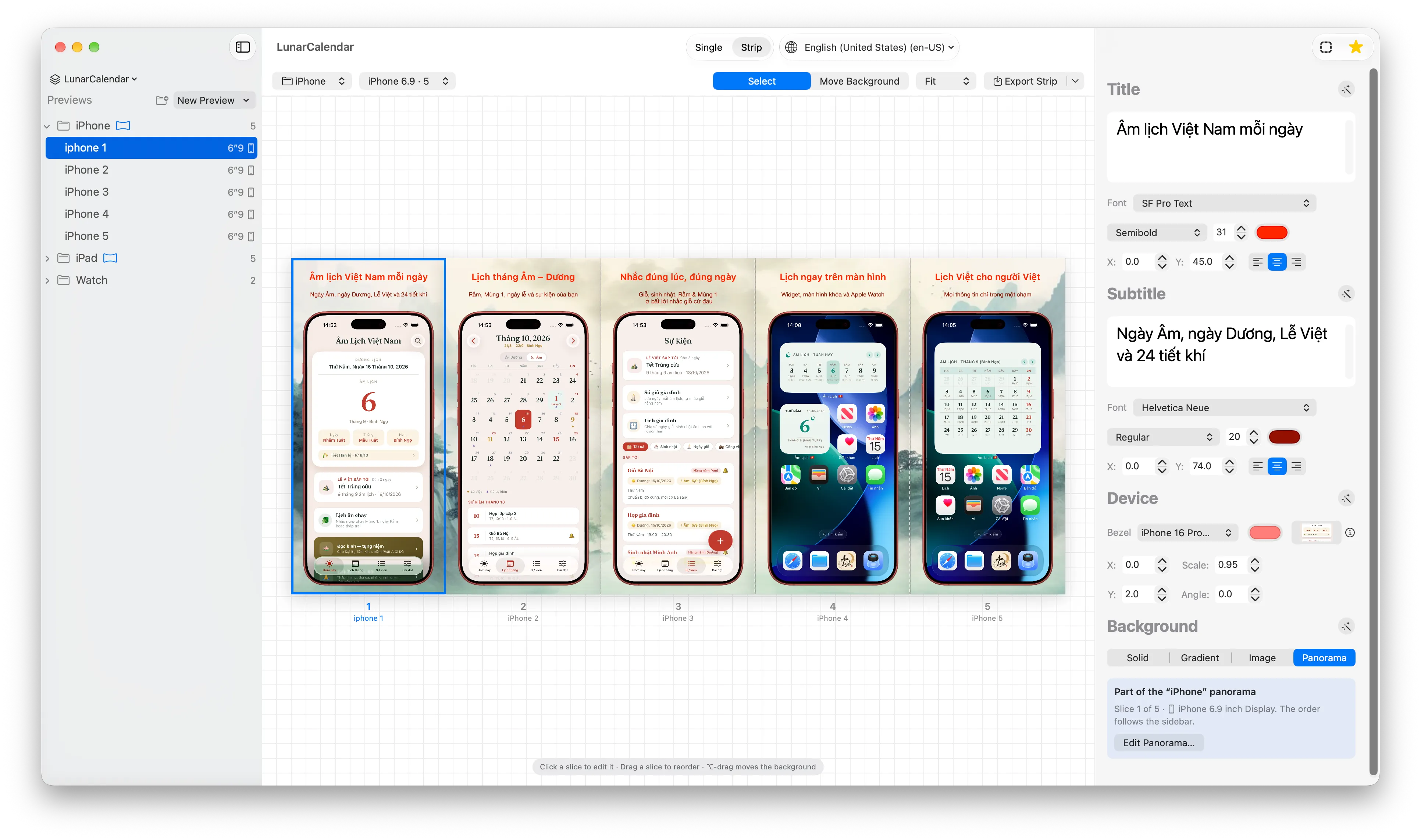
One background that runs across several screenshots. See the whole strip and drag to reorder.
Multiple languagesPRO
Each language gets its own text and screenshots. Translate on device with Apple’s Translation, import and export CSV.
Folders and projects
Group screenshots in folders, undo anything, and share a whole project as an .appshot file.
App icon generator
A separate window for building your app’s icon.
The exact sizes the App Store asks for
Exports have exactly the pixel dimensions App Store Connect accepts, so there is nothing to crop or resize.
| Device | Size (px) |
|---|---|
| iPhone Duo · outer displayNEW | 1398 × 20342034 × 1398 |
| iPhone Duo · inner displayNEW | 2007 × 28532853 × 2007 |
| iPhone 6.9″ | 1320 × 2868 |
| iPhone 6.5″ | 1290 × 2796 |
| iPad 13″ | 2064 × 2752 |
| Mac | 2880 × 1800 |
| Apple Watch | 410 × 502 |
| Apple TV | 3840 × 2160 |
Free, with an upgrade when you need it
Free
Enough for a complete set of screenshots for one app.
- Every device frame, background and type style
- Export PNGs one at a time, at the right size
- Folders, Copy/Paste Style, icon generator
- 1 project
Pro · one-time purchase, $5.99
For people shipping several apps or several markets.
- Panorama backgrounds and Strip view
- Add languages, Translate Missing, CSV import
- Batch export every image in every language
- Unlimited projects, .appshot export
Your data stays on your Mac
Projects and images are stored on your Mac. No account, no server, no analytics, and your images are never uploaded anywhere.